
NHS North West Genomics
2.2.5 - ci-build

NHS North West Genomics
2.2.5 - ci-build
NHS North West Genomics - Local Development build (v2.2.5) built by the FHIR (HL7® FHIR® Standard) Build Tools. See the Directory of published versions
Diagnostic testing (Laboratory Testing Workflow) is a supporting workflow that is embedded within the wider clinical care pathway rather than a separate process. The laboratory or diagnostic service is used whenever the clinical team needs additional evidence to make, confirm, monitor, or review a diagnosis and treatment plan.
graph TD;

    A[Assessment]-->|Creates Observations| B;
    A--> |"Orders (LAB-1)"| T;
    T[Diagnostic Testing<br/>Laboratory Test Workflow] --> |"Diagnostic Report (LAB-3)"| A
    B[Diagnosis]-->|Creates Condition| C;
    C[Plan]-->|Creates Goals and Tasks| D;
    D[Implement/Interventions]-->|Actions Tasks| E;
    D --> |"Monitoring<br/>Orders (LAB-1)"| T;
    T --> |"Monitoring<br/>Diagnostic Report (LAB-3)"| D
    E[Evaluate]--> |Reviews Care| A;

    click T StructureDefinition-ServiceRequest.html

    classDef purple fill:#E1D5E7;

    classDef yellow fill:#FFF2CC;
    classDef pink fill:#F8CECC
    classDef green fill:#D5E8D4;
    classDef blue fill:#DAE8FC;
    classDef orange fill:#FFE6CC;

    class A pink
    class B yellow
    class C green
    class D blue
    class E orange

    class T purple
The diagnostic testing begins when the Order Placer creates a laboratory order after determining that diagnostic testing is required. At the same time, the requesting organisation arranges for the patient's specimen to be collected. The laboratory order (LAB-1) is transmitted electronically to the laboratory, while the physical specimen is collected and transported to the testing facility.
When an order has been entered manually, or when the Specimen arrives at the laboratory, a laboratory filler order (LAB-2) is generated.
Within the Order Filler, the laboratory receives both the electronic order and the specimen. Laboratory staff perform the requested tests, validate the results, and produce a diagnostic report. Once authorised, the laboratory sends the completed laboratory report (LAB-3) back to the requesting clinical system.
graph
    subgraph OrderPlacer;
        T["Create Order "]
        T --> |Arranges| S[Specimen Collection]
    end
    subgraph OrderFiller
        AN["Performs Tests"]

        AN --> P["Writes Report"];
    end
    FM[Filler Order Management]

    T --> |"Sends Laboratory Order (LAB-1)"| AN;
    S --> |Sends Specimen| AN;
    AN --> |"Sends Laboratory Filler Order (LAB-2)"| FM;
    P --> |"Sends Laboratory Report (LAB-3)"| OrderPlacer;
Order Filler generates one or more Work Orders (LAB-4). A work order contains the operational instructions needed by the diagnostic equipment, such as the specimen identifier, requested tests, analyser configuration, priority, and quality control requirements. These work orders are transmitted to the appropriate laboratory instruments or automation manager, which routes specimens and schedules testing across one or more analysers.
The Diagnostic Equipment performs the requested analytical procedures and measures the required biomarkers or characteristics of the specimen. Once testing is complete, the instrument returns the measured values as Test Results (LAB-5) to the Order Filler. These results typically include quantitative or qualitative observations together with instrument identifiers, measurement units, reference ranges, flags indicating abnormal values, quality control information, and timestamps.
graph
    OrderFiller[Order Filler]
    DiagnosticEquipment

    OrderFiller --> |"Work Order (LAB-4)"| DiagnosticEquipment["DiagnosticEquipment<br/>(Automation Manager)"]
    DiagnosticEquipment --> |"Test Results (LAB-5)"| OrderFiller
| Actor | Definition |
|---|---|
| Order Placer | Commonly known as the Electronic Patient Record (EPR) System or Order Communications System |
| Order Filler | Genomic Laboratory Hub (GLH), Laboratory Information System (LIMS) |
| Automation Manager | Often software associated with analysers and Laboratory Analytical Workflow (IHE LAW); may be performed by the Laboratory Information System (LIMS) |
| Genomic Analysis and Interpretation | Bioinformatics pipelines and Decision Support Systems (DSS) that analyse and interpret raw genomic data from analysers, returning reportable variants and a summary interpretation (e.g. Omics DSS, Genomics England) |
| Order Result Tracker | This is often provided by Electronic Patient Record (EPR) Systems |
| Laboratory Report (Clinical Document) | See Clinical Document |
| Intermediary | E.g. Regional or Trust Integration Engine |
| Filler Order Management | Software used to manage the orders. This may be the Order Placer. |
See also Reference 1, Section 3 Laboratory Testing Workflow (LTW) Profile, for detailed description of actors.
IHE LTW Actor Diagram
Initially only the IHE LAB-1 and LAB-3 are in focus. Later stages will include the use of Genomic Order Management Service.
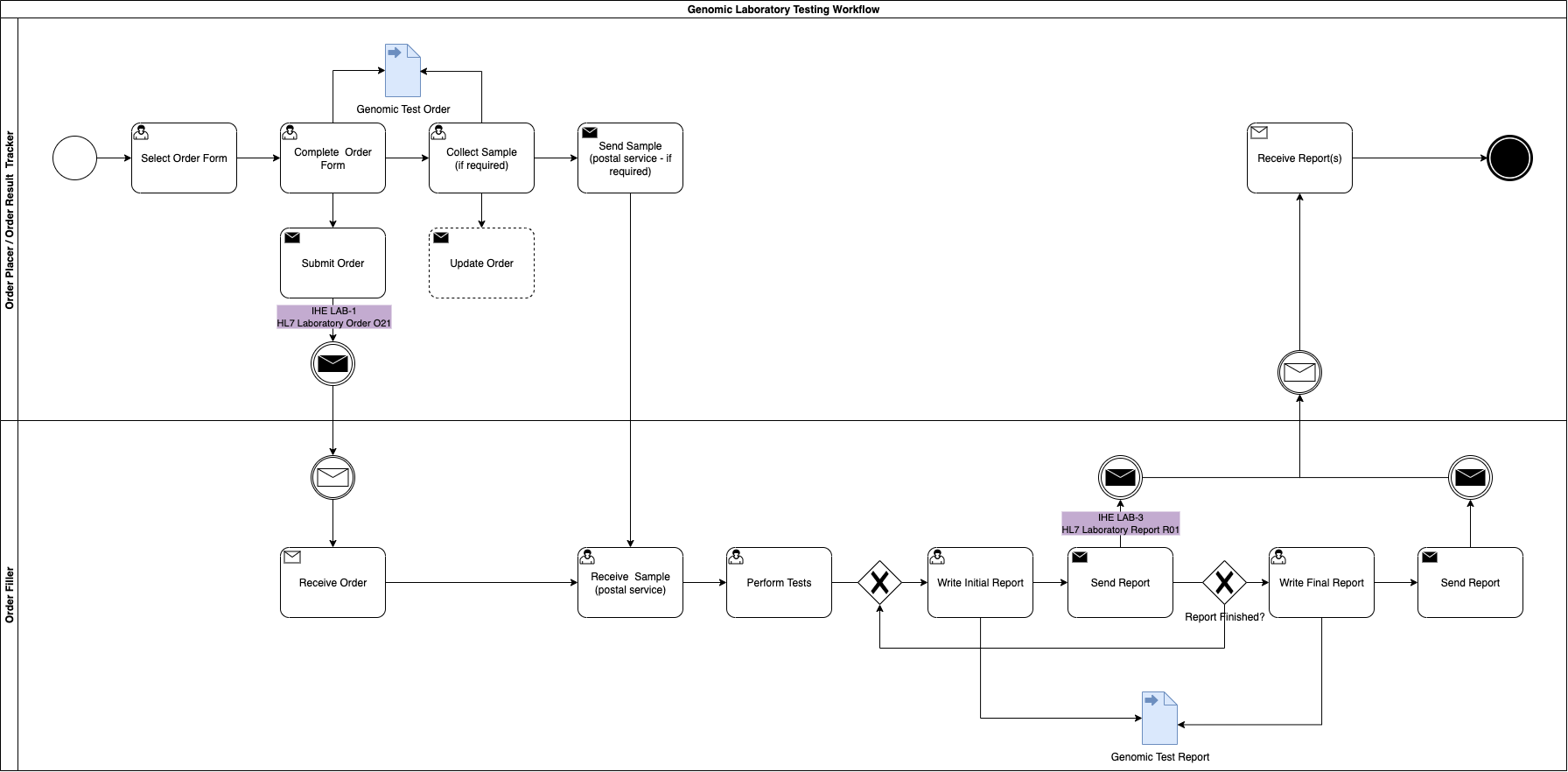
Genomic LTW Business Process
The sample may not need collecting by the ordering clinician for 2 reasons
- it has already been sent to the GLH and extracted DNA is already stored there
- the sample is somewhere else in the country. In this instance the ordering clinician will need to arrange the sample transfer to the GLH.
The processes above are described in more detail in:
From a high-level perspective, the process is shown below:
Where the Order Placer sends the Laboratory Order to the Order Filler, the lab performs the test and then sends the Laboratory Report back to the Order Placer. However, variations can exist such as the order is updated or the order is entered directly on the Order Filler system (these are currently out of scope).
sequenceDiagram
    participant clinician as Order Placer<br/>Clinician (EHR)
    participant nurse as Specimen Collection<br/>Clinician/Nurse
    participant LIMS as Order Filler<br/>LIMS

    clinician -->> clinician: Creates Order
    note over clinician,LIMS: IHE LAB-1 Laboratory Order
    clinician ->> LIMS: Sends Laboratory Order
    clinician -->> nurse: Requests specimen collection
    nurse -->> nurse: Collect Specimen
    nurse -->> LIMS: Ship Specimen
    LIMS -->> LIMS: Perform Test
    LIMS -->> LIMS: Write Report
    note over clinician,LIMS: IHE LAB-3 Laboratory Report
    LIMS ->> clinician: Sends Laboratory Report
Used by these Use Cases:
An order is created by the clinical practice and placed to the laboratory.
graph LR
    S[Select Genomic Test Order Form];
    C[Complete Genomic Test Order Form];
    G[Submit Genomic Test Order Form];
    F[Form Data Extraction]
    Specimen[Specimen Collection]

    S --> C
    C --> |Form| F
    F --> |Test Order| G
    C --> |Arrange| Specimen
graph TD;
    subgraph OrderPlacer;
        EHR["EPR or Order Comms"]
        SpecimenCollection[Specimen Collection]
        OR[Acute Hospitals<br/>Trust Integration Engine]
        EHR --> |HL7 v2 O01/O21| OR
        EHR --> |"2. Asks for (Order)"| SpecimenCollection
    end

    RIE["Regional Orchestration Engine (RIE)"]
    GDP["Genomic Data Platform<br/>(FHIR Repository)"]
    PubSub["Subscription Service (Future?)"]

    subgraph OrderFiller;
        iGene[LIMS<br/>IGene]
        GOMS["NHS England Genomic Order Management System"]
        ExtLIMS[External GMSA/LIMS]
    end

    SpecimenCollection[Specimen Collection] --> |3. Sends Specimen| OrderFiller
    OR --> |HL7 FHIR Message O21| RIE
    RIE -.-> |"Update<br/>FHIR RESTful PUT/POST (inc Transaction)"| GDP
    RIE --> |HL7 v2 O21| iGene
    RIE --> GOMS
    GOMS --> ExtLIMS
    GDP -.-> |O21 Event Notification| PubSub

    classDef green fill:#D5E8D4;
    classDef yellow fill:#FFF2CC;
    classDef pink fill:#F8CECC;
    class RIE,GDP,PubSub pink;
    class OR green;
Within the system creating the genomics order, the practitioner will select a form for the test required. Below are several examples from North West Genomic Laboratory Hub - Test Request Forms. How this is implemented will vary between different NHS organisations and systems they use.
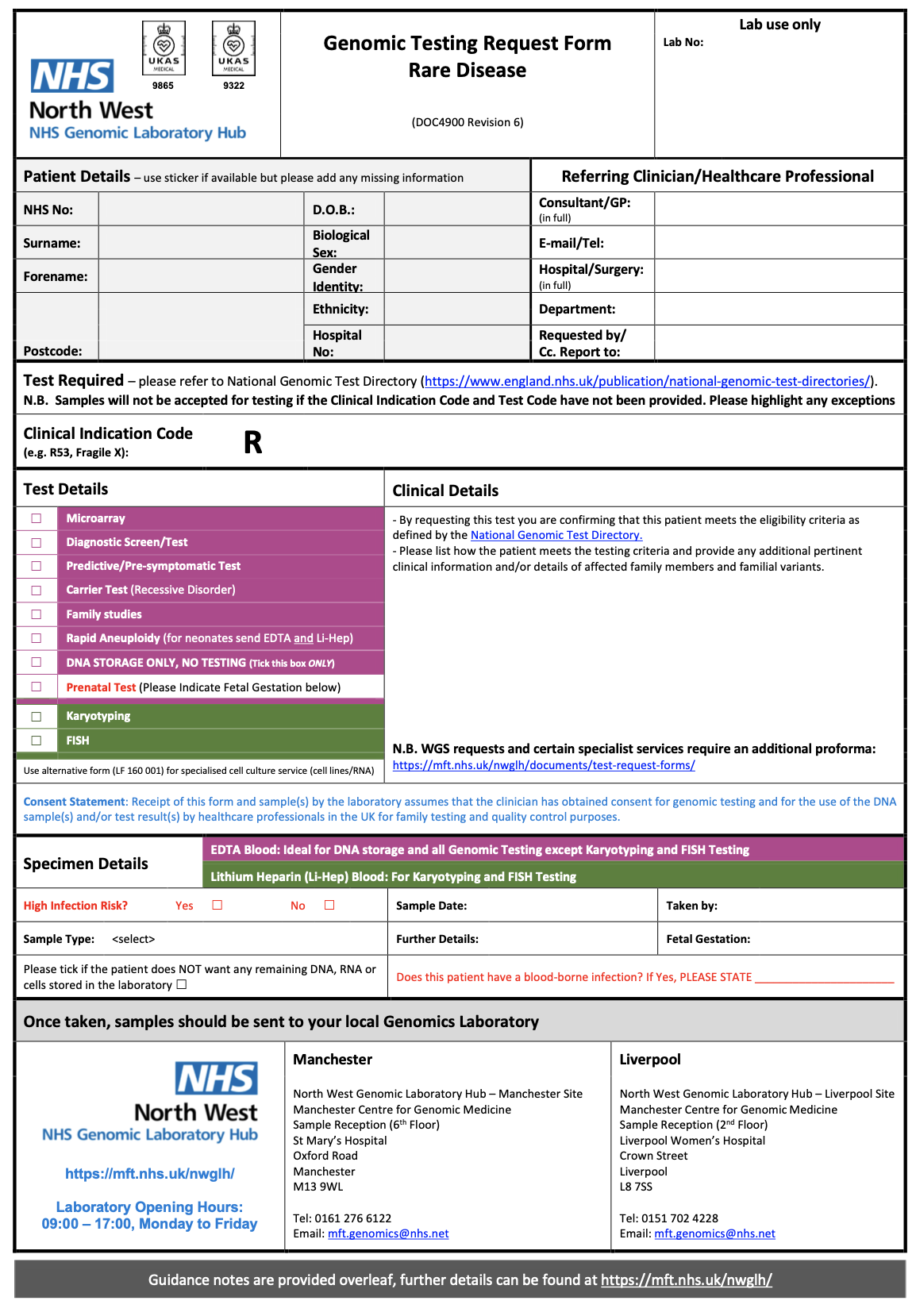
NW GLH Genomic Testing Request Form – Rare Disease |
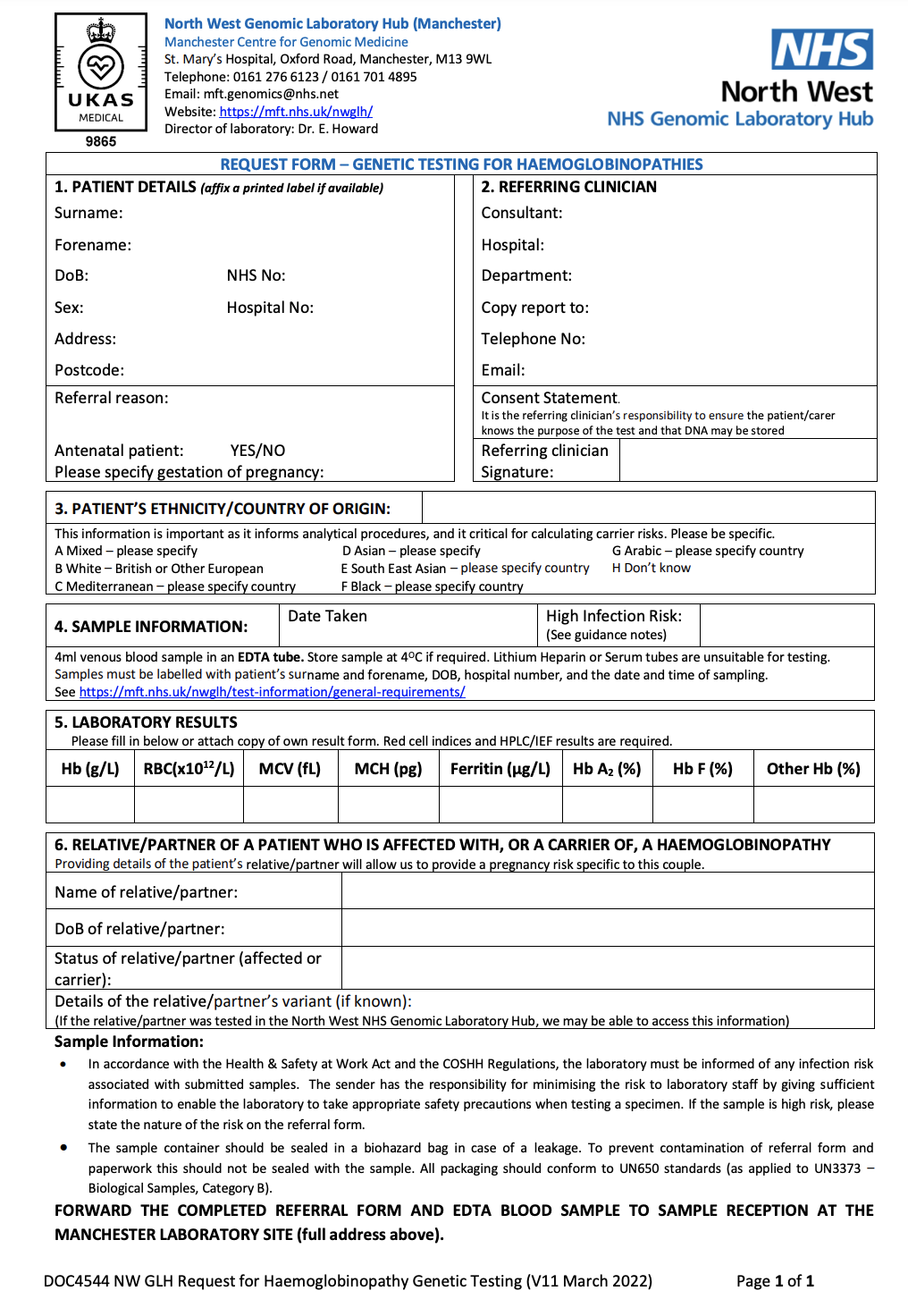
Request for Genetic Testing for Haemoglobinopathies |
These forms will have a computable definition called a template (FHIR Questionnaire) which will list the technical content requirements for the form.
on the wire format see Genomic Test OrderThis archetype definition can also support HL7 Structured Data Capture should the Order Placer system support these features.
For submission, this form will be converted by the Order Placer to a communication format called HL7 FHIR (and for compatability reasons HL7 v2. If the Order Placer has a FHIR enabled Electronic Patient Record (e.g. EPIC, Cerner, Meditech, etc), they may use HL7 SDC - Form Data Extraction to assist with this process.
For details on the relationship between forms and HL7 v2/FHIR see Genomic Test Order
The completed form is submitted to the Regional Orchestration Engine following:
sequenceDiagram
participant EPR as Order Placer
participant TIE as Intermediary<br/>NW GLH Regional Orchestration Engine (RIE)
participant LIMS as Order Filler

EPR ->> EPR: Select Test Order Form
EPR ->> EPR: Complete Test Order Form

note over EPR,LIMS:IHE LAB-1 Laboratory Order
EPR ->> TIE: Send HL7 FHIR Message<br/>Laboratory Order O21
TIE ->> LIMS: Send HL7 v2 Message<br/>OML_O21

EPR ->> EPR: Collect Sample
EPR -->> LIMS: Send Sample
LIMS ->> LIMS: Update Test Order
After submitting the original order, the sample will be collected and sent to the Order Filler. The Order Filler will update the Test Order to include details such as a specimen collection date, order filler number, etc.
Used by these Use Cases:
A report is created by the clinical practice and sent to the order result tracker.
Genomics Test Report Activity
graph TD;

    subgraph OrderFiller;
        iGene[LIMS<br/>IGene]
        GOMS["NHS England Genomic Order Management System"]
        ExtLIMS[External GMSA/LIMS]
    end

    subgraph OrderPlacer;
        EHR["EPR or Order Comms"]

        OR[Acute Hospitals<br/>Trust Integration Engine]
        OR --> |HL7 v2 R01| EHR

    end
     RIE["Regional Orchestration Engine (RIE)"]
     GDP["Genomic Data Platform<br/>(FHIR Repository)"]
    PubSub["Subscription Service (Future?)"]

    RIE --> |HL7 v2 R01| OR
    RIE -.-> |"Update<br/>FHIR RESTful PUT/POST (inc Transaction)"| GDP
    iGene --> |HL7 v2 R01| RIE
    GOMS --> RIE
    ExtLIMS --> GOMS
    GDP -.-> |R01 Event Notification| PubSub

    classDef green fill:#D5E8D4;
    classDef yellow fill:#FFF2CC;
    classDef pink fill:#F8CECC;
    class RIE,GDP,PubSub pink;
    class OR green;
sequenceDiagram
participant EPR as Order Placer
participant TIE as Intermediary<br/>NW GLH Regional Orchestration Engine (RIE)
participant LIMS as Order Filler

LIMS ->> LIMS: Perform Diagnostic Test
LIMS ->> LIMS: Write Preliminary Report

opt
note over LIMS,EPR: IHE LAB-3 Laboratory Report (preliminary)

LIMS ->> TIE: Send HL7 v2 Message<br/>Laboratory Report ORU_R01
TIE ->> EPR: Send HL7 v2 Message<br/>Laboratory Report ORU_R01
end
LIMS ->> LIMS: Complete Report

note over LIMS,EPR: IHE LAB-3 Laboratory Report (final)

LIMS ->> TIE: Send HL7 v2 Message<br/>Laboratory Report ORU_R01
TIE ->> EPR: Send HL7 v2 Message<br/>Laboratory Report ORU_R01

note over EPR,TIE: When all tests in the order are complete

TIE ->> EPR: Task complete notification\n(Can be an email notification)
LAB-2 is aimed at sending a copy of the order back to the Order Placer, and this will include updated data items such as Order Filler Number. It is envisaged this design will also extend to Laboratory Reports (R01).
Used by these Use Cases:
graph TD


OrderFiller[Order Filler]
GDP["Genomic Data Platform"]
PubSub["Subscription Service (Future?)"]
RIE[RIE Message Distribution]
OrderPlacer[Order Placer or Interested Party]

OrderFiller --> GDP
GDP -.-> |O21 Event Trigger| PubSub
GDP --> |O21 Event Trigger| RIE
RIE --> |HL7 v2 OML_O21| OrderPlacer
PubSub -.-> |Event Notification| OrderPlacer

classDef purple fill:#E1D5E7;
classDef pink fill:#F8CECC;
classDef yellow fill:#FFF2CC;

class GDP,RIE,PubSub pink;
class OrderFiller,OrderPlacer yellow
graph TD;

    OrderPlacer[Order Placer]

    subgraph OrderFiller;

        OrderManagment --> |Work Order LAB-4| AutomationManager
        AutomationManager --> |Test Results LAB-5| OrderManagment
        OrderManagment --> WriteReport
    end

    ExtOrderPlacer[External AutomationManager]
    OrderManagment --> |"Work Order LAB-4"| ExtOrderPlacer
    ExtOrderPlacer --> |Test Results LAB-5| OrderManagment

    OrderPlacer --> |Laboratory Order LAB-1| OrderFiller
    WriteReport --> |Laboratory Report LAB-3| OrderPlacer

    classDef purple fill:#E1D5E7;

    classDef yellow fill:#FFF2CC;
    classDef pink fill:#F8CECC
    classDef green fill:#D5E8D4;
    classDef blue fill:#DAE8FC;
    classDef orange fill:#FFE6CC;
sequenceDiagram
    participant clinician as Order Placer<br/>Clinician (EHR)
    participant nurse as Specimen Collection<br/>Clinician/Nurse
    participant LIMS as Order Filler<br/>LIMS
    participant Sub as Workflow Automation

    clinician -->> clinician: Creates Order
    note over clinician,LIMS: IHE LAB-1 Laboratory Order
    clinician ->> LIMS: Sends Laboratory Order
    clinician -->> nurse: Requests specimen collection
    nurse -->> nurse: Collect Specimen
    nurse -->> LIMS: Ship Specimen

    note over LIMS,Sub: IHE LAB-4 Work Order Management
    LIMS ->> Sub: Send Instance Order
    LIMS -->> Sub: Ship Specimen
    Sub -->> Sub : Perform Test

    note over LIMS,Sub: IHE LAB-5 Test Results Management
    Sub ->> LIMS: Sends Laboratory Report / Sends Laboratory Analyte Result

    LIMS -->> LIMS: Write Report

    note over clinician,LIMS: IHE LAB-3 Laboratory Report
    LIMS ->> clinician: Sends Laboratory Report
BCR-ABL1 concentration testing (M84.2) is used to monitor the amount of the fusion gene (Philadelphia chromosome) in chronic myeloid leukemia (CML) patients, with results typically reported on an International Scale (%IS) to measure treatment response.
sequenceDiagram

participant LIMS as Order Filler
participant Device as Automation Manager

LIMS ->> Device: Send Work Order Manangment LAB-4 O21
Device ->> Device: Perform Tests
Device ->> LIMS: Send Test Results Management LAB-5 R22/R32
Used by these Use Cases:
graph TD

subgraph GenomicLIMS["Order Filler"];
    iGene[LIMS<br/>IGene]
end

RIE4["RIE Workflow Orchestration"]

subgraph Analyser["Automation Manager"];
    Cepheid[Analyser - Cepheid]
    StarLIMS[LIMS - StarLIMS]
    GOMS["NHS England Genomic Order Management System"]
    ExtLIMS[External GMSA/LIMS]
end

GDP["Genomic Data Platform<br/>(FHIR Repository)"]
PubSub["Subscription Service (Future?)"]

RIE4 --> |"Update<br/>FHIR RESTful PUT/POST (inc Transaction)"| GDP
GDP -.-> |O21 Event Notification| PubSub

iGene --> |"Work Order Management (LAB-4)<br/>Worksheet (iGene CSV export)"| RIE4
GDP <--> |"Work Order Management (LAB-4)<br/>HL7 QBP Query"| Cepheid
GDP <--> |"Work Order Management (LAB-4)<br/>HL7 FHIR RESTful Query"| StarLIMS
RIE4 --> |"Work Order Management (LAB-4)<br/>FHIR RESTful PUT/POST (inc Transaction)"| GOMS
GOMS --> ExtLIMS

classDef purple fill:#E1D5E7;
classDef pink fill:#F8CECC;

class GDP,RIE4,PubSub pink;
Used by these Use Cases:
graph TD

  subgraph GenomicLIMS["Order Filler"];
    iGene[LIMS<br/>IGene]
  end

  subgraph Analyser["Automation Manager"];
    Cepheid[Analyser - Cepheid]
    StarLIMS[LIMS - StarLIMS]
    ExtLIMS[External GMSA/LIMS]
    GOMS["NHS England Genomic Order Management System"]
    ExtLIMS --> GOMS
  end


  RIE["Regional Orchestration Engine (RIE)"]

  GDP["Genomic Data Platform<br/>(FHIR Respository)"]
  PubSub["Subscription Service (Future?)"]

  RIE -.-> |"Update<br/>FHIR RESTful PUT/POST (inc Transaction)"| GDP
  GDP -.-> |R01 or R32 Event Notification| PubSub

  Cepheid --> |"Test Results Management (LAB-5/LAB-32)<br/>ASTM"| RIE
  StarLIMS --> |"Test Results Management (LAB-5)<br/>FHIR RESTful PUT/POST and Queries"| GDP
  GDP <--> |"Event Triggers and Queries (StarLIMS only)"| RIE
  GOMS --> RIE

  RIE --> |"Test Results Management (LAB-5)<br/>CSV Import"| iGene

  classDef purple fill:#E1D5E7;
  classDef pink fill:#F8CECC;

  class GDP,RIE,PubSub pink;
Includes:
It is recommended that the actors receive patient demographic and encounter updates only within the context of a work order. Whenever patient data changes, due to:
Note: Event trigger definitions based on NHS England HL7 v2 ADT Message Specification which is NHS England's supplement to IHE Technical Framework Volume2: Patient Identity Management [ITI-30] and Patient Encounter Management [ITI-31].
It is common for this requirement to be answered by: